

 Android availability
One fix breaks another feature.
Agree on what may change and what must keep working. When requested, SQM adds checks from applicable rules learned from past incidents.
See what SQM checks ↓FOR CODEX & CLAUDE CODE
A fix breaks something else.
“Done” still needs your checks.
Give your AI work a clearer finish line.
Codex or Claude Code implements, fixes and checks.
SIMY records criteria and progress, then prompts unfinished conversations to continue.
macOS · Apple Silicon / Windows · x64
Requires Codex or Claude Code and a SIMY account.
VIBE CODING, WITH CONFIDENCE
What happens after you ask AI to write the code? Follow a single bug through investigation, decisions, tests and review.
Agree on what may change and what must keep working. When requested, SQM adds checks from applicable rules learned from past incidents.
See what SQM checks ↓Review evidence for each completion criterion. Standard includes an independent review, with unverified operations kept explicit.
See the completion process ↓When progress stalls, SIMY stops and asks for a decision. Review usage in the app. This is not a guaranteed cap on AI-provider spending.
See progress and usage ↓These themes come from individual Reddit experiences. They are neither a representative market survey nor SIMY customer testimonials.
A COMIC GUIDE TO SIMY CLI
This example uses Codex. Codex changes the code and checks the interface; SIMY prompts the conversation to continue when criteria remain unverified. The same roles apply with Claude Code.
01 The problem: the button fails.
Codex built my booking page, but the button does nothing in mobile view…

Checks in the intended view can still remain after the page is built.
02 The request: agree on the check.
SIMY, keep Codex fixing and checking until the booking screen opens in mobile view.
We’ll use “opens in mobile view” as the finish line.
Set a concrete finish line for this Codex conversation.
03 Keep going: the check is missing.
I found the cause and changed the code.
The booking screen check is still missing. Continue through the interaction check.
When Codex ends a turn with criteria still unverified, SIMY prompts the same conversation to continue.
04 The result: review, then decide.
I checked in mobile view. The booking screen opens. Here are the results.
Now I can review the results and decide whether to publish.
Codex returns the check results. You decide whether to publish.
WHO DOES WHAT?
Even if a turn ends with “I changed the code.”
If “the booking screen opens in mobile view” is still recorded as unverified, SIMY prompts the same conversation to continue through that check. Codex performs the check and returns the results.
The AI needs suitable tools and permission to perform the checks. Stalled progress, missing access or necessary decisions can require your input. Installing SIMY does not guarantee a successful fix.
This is an illustrative browser mobile-viewport example, not actual UI, a customer case study or production results. If a physical-device check is required, include that criterion and a way to perform it. The AI needs appropriate tools and permission. Publishing follows your authorization and required approvals. View the unlettered artwork ↗
01 / DELIVERY LOOP
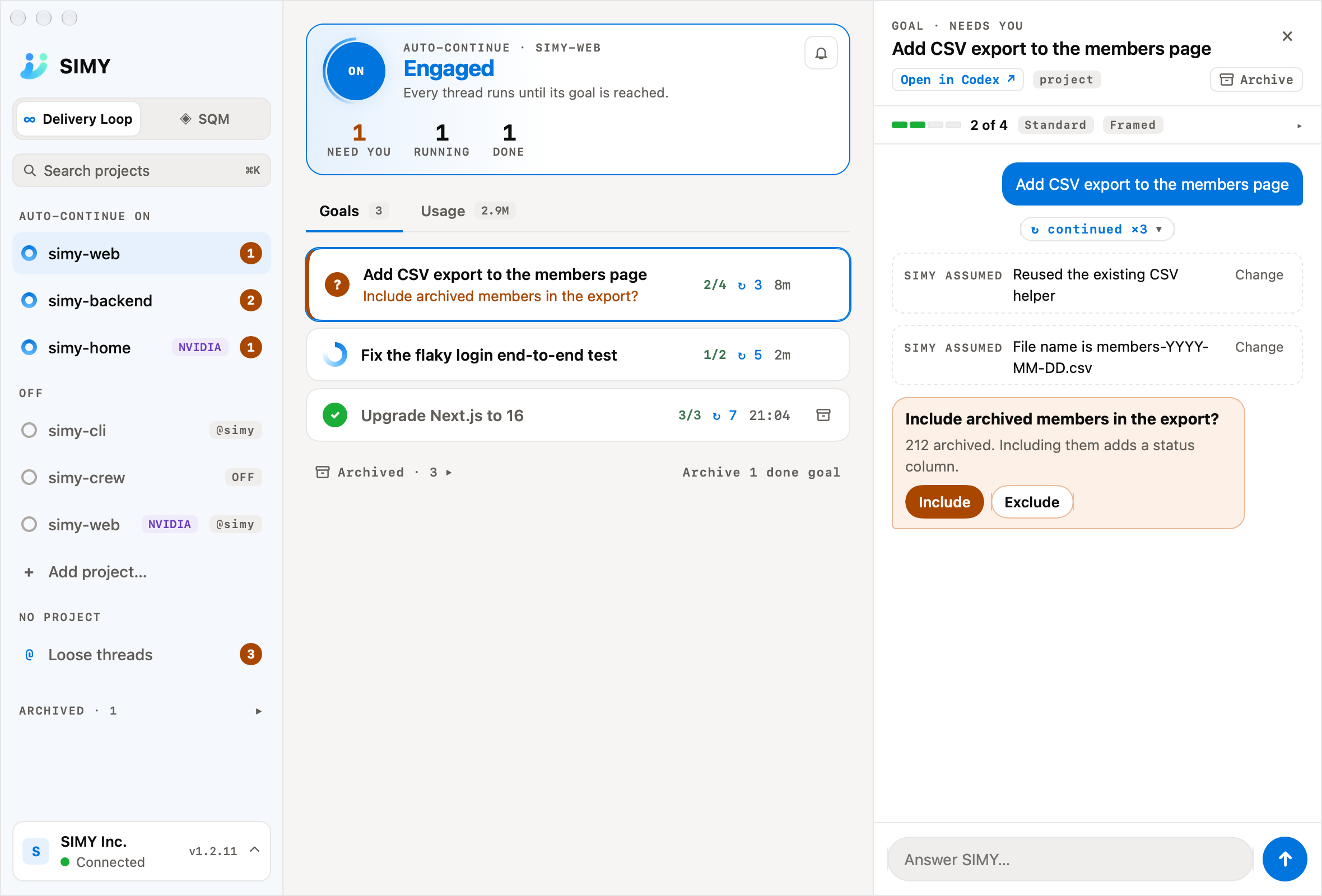
SIMY turns your request into completion criteria, prompts the conversation to continue when work remains, and asks you to decide when needed.
@simy Make the booking button open the booking screen on mobile. Keep going through fixes and interaction checks.An example request. This page does not execute work.
Define what counts as complete, what to verify and the scope of the work.
SIMY prompts unfinished work to continue. Standard includes a final independent review; Careful also includes a design check before editing.
Review observations for each completion criterion, changes and test results from the conversation or app.
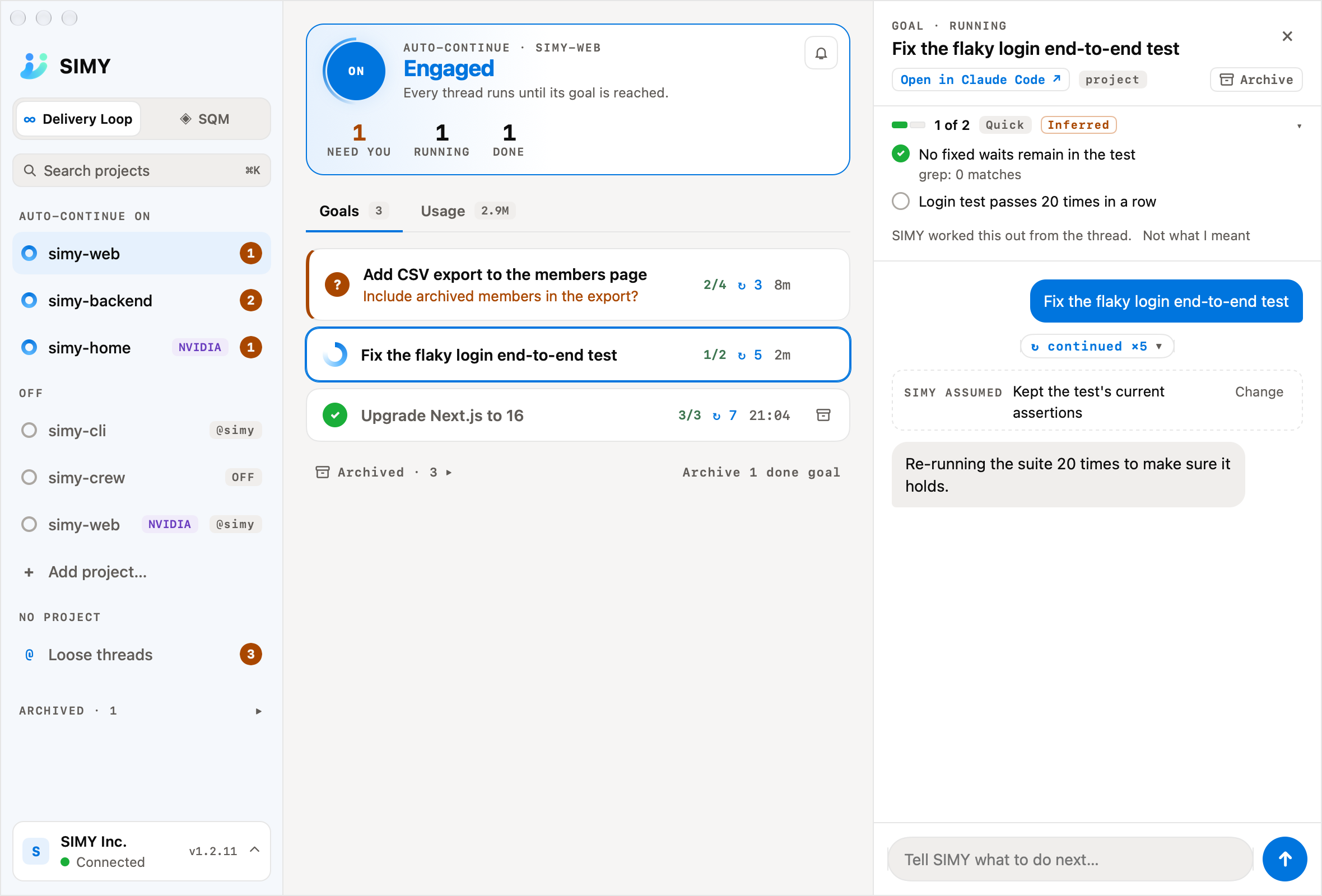
You choose the scope.Turning a project ON applies to conversations started afterwards. For one conversation, ask @simy continue. Merging and publishing follow the scope you authorized and required approvals.
02 / SQM QUALITY CHECK
SQM draws on incident knowledge and checks the rules applicable to your change. The app records findings and follow-up actions.
Ask SIMY to check a change with SQM. Review the results, findings and follow-up in the app.
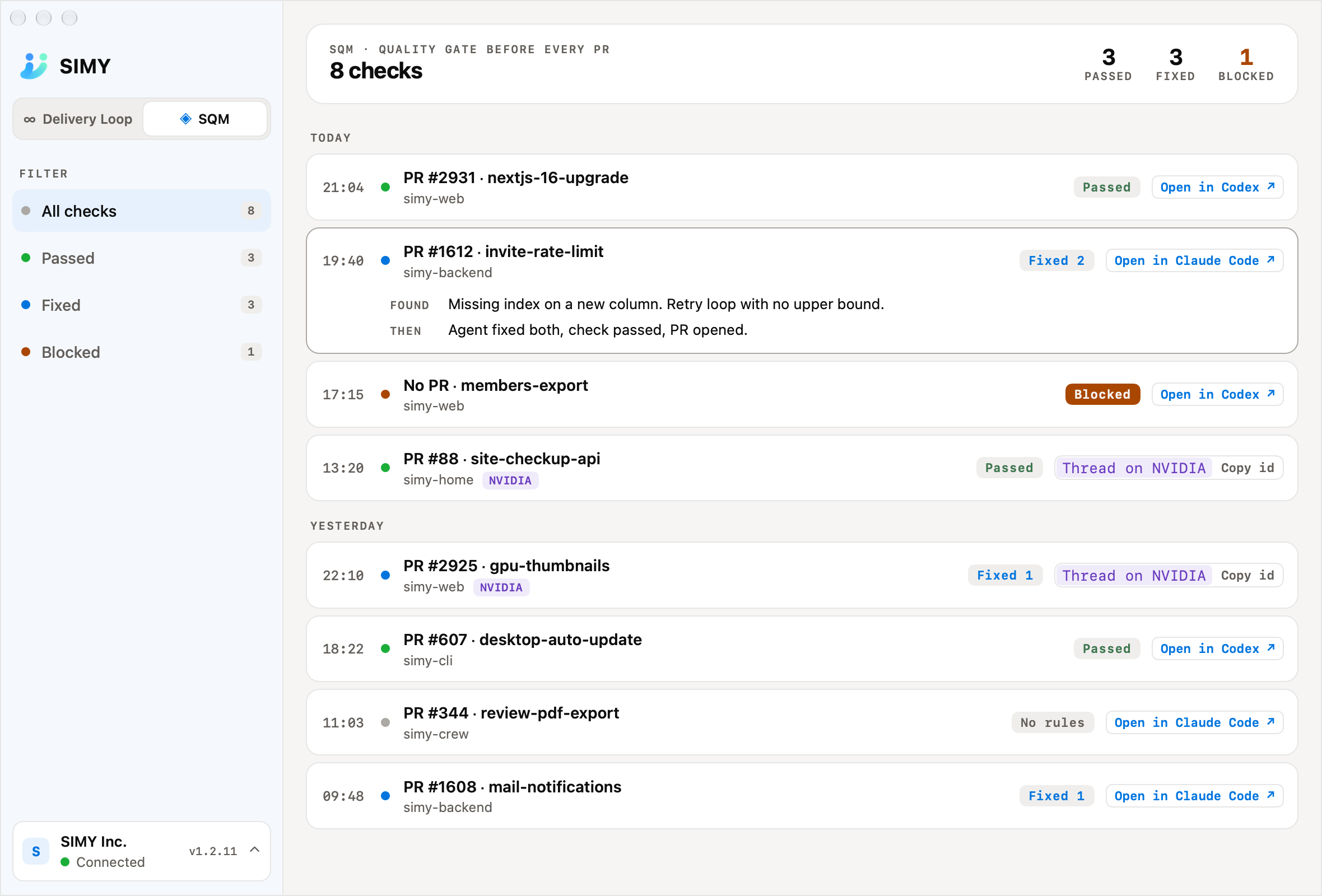
SQM requires an explicit request or enablement. Creating a PR or pushing code alone does not run it. No applicable rules does not establish the quality of the entire change. Keep normal tests and real-environment acceptance checks.
03 / DESKTOP APP
See work in progress, decisions waiting for you, paused work and completed tasks across projects, along with connections and usage.
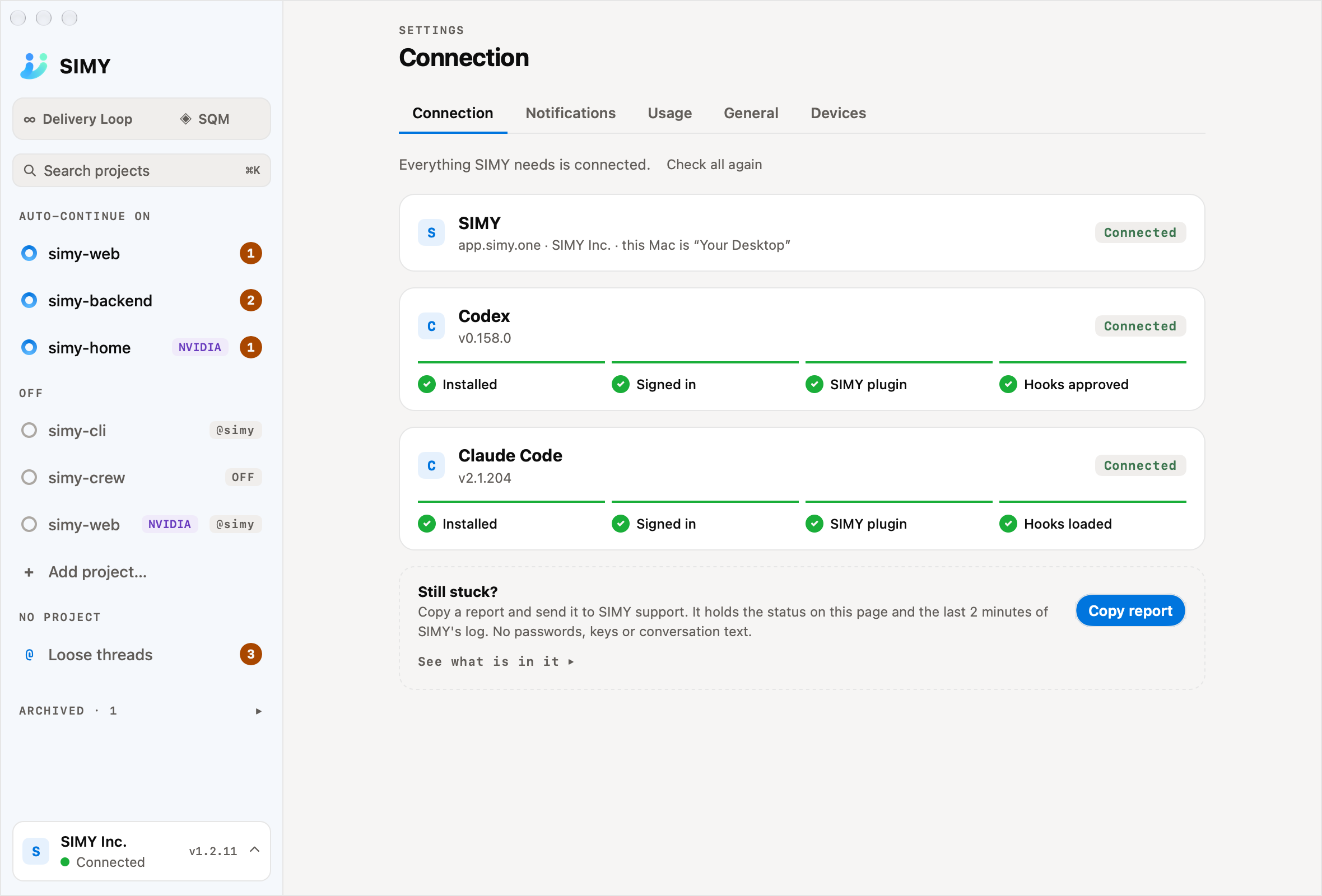
CONNECTION
Check installation, sign-in, plugins and hook approval step by step, with guidance for what is missing.
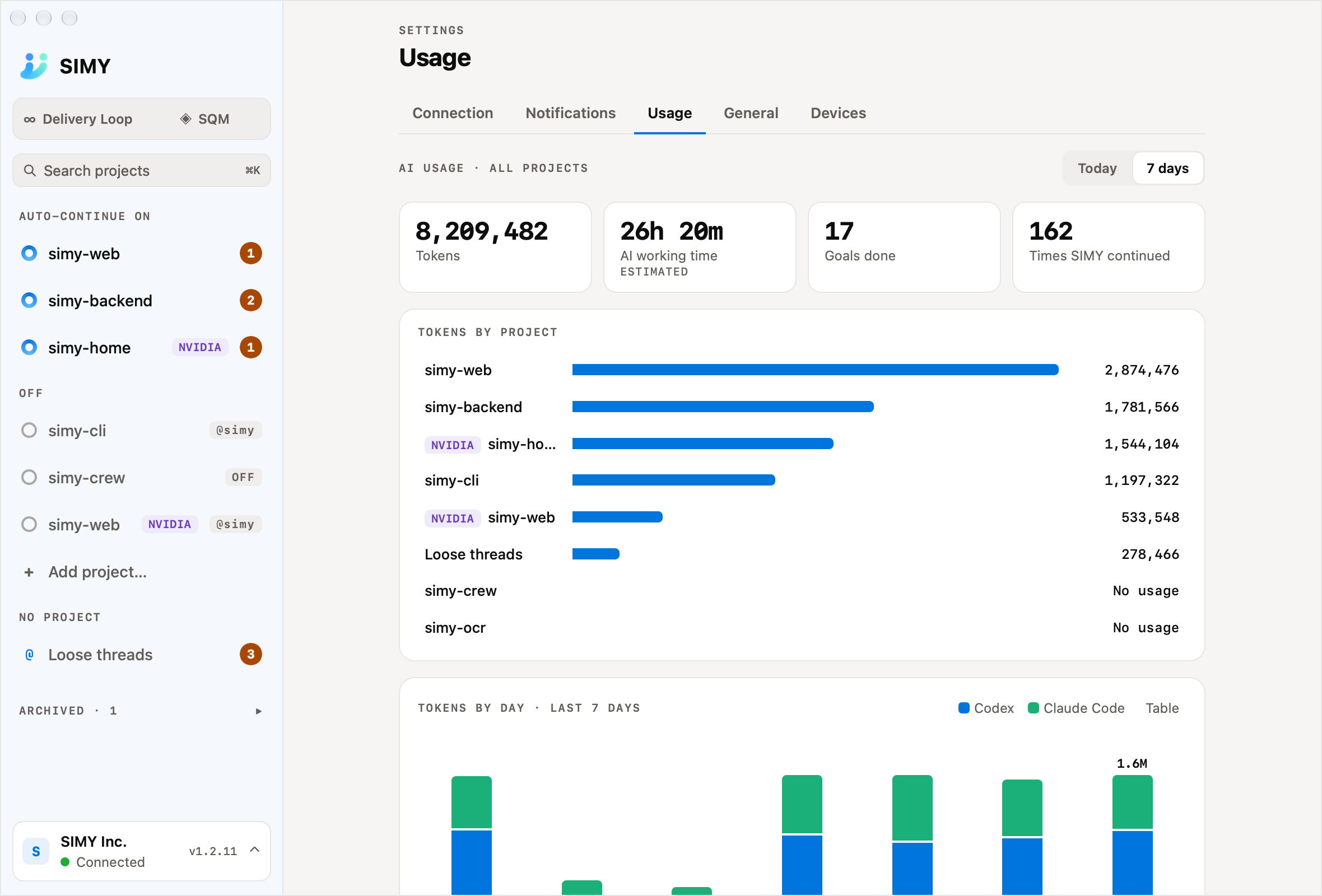
USAGE
Review tokens, completions and continuation counts by day and tool. AI work time is shown as an estimate.
Review questions in the app and respond through choices or conversation. Return to the original Codex or Claude Code conversation.
Get desktop notifications for decisions, completions and connection problems. Configure notification types and quiet hours.
See work on SSH-connected computers. Each connected computer needs SIMY CLI installed and signed in with the same account.
Connect requests in SIMY Web to AI on this computer.SIMY CLI can bridge local development tasks requested from SIMY Web to this computer’s Codex or Claude Code. Complete the tools’ sign-in, connection and required approvals first.
The five app images are native UI captures rendered from the same source as release v1.2.11, using official English sample fixtures. Counts, results and connections are examples, not customer data or production results. Feature descriptions were checked against v1.2.11 documentation on November 17, 2026. Availability depends on version, plan and connection status.
GET STARTED
Keep working in Codex or Claude Code, with a clearer view of progress and checks.
Download SIMY CLI for your operating system and sign in to your SIMY account.
Follow the connection guide and approve SIMY’s plugin and hooks in your chosen tool.
Ask @simy continue, or turn a project ON in the app and start a new conversation.
Apple Silicon, macOS 12 or later. Launch at login requires macOS 13 or later.
Windows preview: Windows 10 or 11, x64. The distribution is unsigned and some physical-device flows are still being verified. Try it on a test computer first. ARM64 and WSL are not supported.
Codex CLI 0.158.0+ or Claude Code 2.1.200+. Tool sign-in and SIMY hook approval are required. Check each tool’s terms and fees.
PLANS / PRICING
SIMY CLI requires SIMY by Industry with the IT Engineer package. Starter does not include CLI access. Existing customers should check their organization’s access in the app before purchasing.
These are existing SIMY plan prices, billed in USD. Japan tax examples use 10%; checkout calculates applicable taxes. Existing customer? Sign in ↗
SIMY PLAN
SIMY CLI with the IT Engineer package.
$71.80 / month, before tax
Monthly billing · $78.98 with illustrative 10% Japan tax
One annual payment of $717.60 before tax ($789.36 with illustrative Japan tax).
Included in this SIMY plan
Base plan: 1 calendar month free, then automatic renewal. Cancel before the trial ends to avoid the plan charge. Checkout shows applicable taxes and the final terms.
SIMY PLAN
SIMY Web plan. Not eligible for SIMY CLI.
$35.80 / month, before tax
Monthly billing · $39.38 with illustrative 10% Japan tax
One annual payment of $357.60 before tax ($393.36 with illustrative Japan tax).
Included in this SIMY plan
Base plan: 1 calendar month free, then automatic renewal. Cancel before the trial ends to avoid the plan charge. Checkout shows applicable taxes and the final terms.
AI-service fees are separate.The SIMY fees do not include Codex, Claude Code or other connected AI-service charges. Check your provider plan and usage. See current SIMY pricing ↗
Private networks and dedicated environments use an individual Enterprise quotation.
ENTERPRISE / PRIVATE NETWORK
We assess a tailored configuration for restricted networks. A proposal follows review of your network, AI execution environment, operating policies, validation scope and costs.
Discuss allowlisted connections or a fully disconnected, air-gapped environment. Review proxies, connection restrictions and what information may leave.
Discuss on-premises or private-cloud deployment. Design AI execution, authentication, code and work-record storage around your requirements and licensing.
Plan SQM knowledge updates, app distribution, audit logs and maintenance. Verify the available capabilities before deployment.
ENTERPRISE
Custom quote
Pricing depends on users, hosting, connection restrictions, required capabilities and support.
Discuss your environment ↗See standard pricing ↑Air-gapped configurations require a deployment assessment.The standard distribution assumes SIMY sign-in and access to the connected AI service. Availability in a private configuration is determined after designing and testing AI execution, authentication, SQM updates and supported capabilities.
Please share your user count, operating systems, hosting location, external-connection policy, preferred AI and support requirements.
AFFILIATE PROGRAM
The program uses personal referral links and ready-to-paste banner HTML, with referred paid subscriptions and commissions in a dedicated dashboard.
Approved affiliates would share links or banners on blogs and social channels, clearly identifying affiliate advertising.
A 14-day attribution window and 50-day review period. The first eligible paid invoice is the basis; even a partial refund cancels its entire commission.
Once eligible balances reach $100 USD, affiliates can request USD settlement by the end of the following month.
Eligible plans: monthly or annual Starter and SIMY by Industry. Terms are listed on the program page. Launch is being prepared; referral tracking and payments have not started.
GOOD TO KNOW
Not if your current organization has an eligible subscription and access permissions. Sign in and check Plan settings first. Current eligibility includes SIMY by Industry with IT Engineer and eligible existing Pro subscriptions. Starter is not eligible. Visiting this page does not change your price or renewal date. If an upgrade is needed, use your existing organization rather than purchasing a duplicate subscription.
Yes. Both can implement changes, run tests, verify results and continue working. Codex also offers Goals with objectives, criteria and evidence.
SIMY is an additional tool for organizing criteria, continuation and decisions consistently across the two tools, with progress across tasks visible in one app. It does not replace the AI that implements the change.
Official documentation: Claude Code’s action and verification loop · Codex Goals
SIMY prompts continuation while criteria remain, but stops for a decision after conditions such as three turns without progress, 30 continuations, or two failed reviews. Tool permission prompts may still require you.
Merging, publishing, production changes, paid services and external messages follow your authorized scope and required approvals. Confirm the target when requesting a paused task to resume.
Project enablement applies to conversations started afterwards. In an existing conversation, ask @simy continue. Turning the project OFF does not cancel work requested individually in a conversation.
A result covers applicable rules and checks actually performed. Some changes have no applicable rules; some operations and environments remain unverified. Combine SQM with tests, real interaction and post-release verification as needed.
Discuss an individual Enterprise configuration. Fully disconnected environments require an assessment of AI execution, authentication and updates. Setup, recurring maintenance and AI/infrastructure costs are quoted separately. See private-network options
YOUR NEXT TASK, WITH SIMY.
Start with one bug you want fixed.
Download SIMY CLI ↗Read the getting-started guide →Effective date not set; new-price signup is not open
This is advance information. Existing signup uses current prices.
JPY for Japanese billing addresses; USD for all other countries. Before tax
Only SIMY Base is free for one month. Add-on licenses are billed from their start date.
| Service | Billing unit | JPY | USD | Included scope |
|---|---|---|---|---|
| SIMY Base | Per user | Monthly billing¥2,280 Annual billing¥22,800One annual payment¥1,900 · monthly equivalent | Monthly billing$15 Annual billing$150One annual payment$12.50 · monthly equivalent | Common features, fair-use Autorun, 10 GB/user, 2 recorded-transcription hours/month |
| SIMY 開発支援 | Per user | Monthly billing¥3,780 Annual billing¥38,160One annual payment¥3,180 · monthly equivalent | Monthly billing$25 Annual billing$252One annual payment$21 · monthly equivalent | Delivery Loop · SQM · No license usage cap |
Regular prices after the free Base month, including one user. Add-on licenses are billed from their start date. Monthly and annual components are billed separately.
1 user · Before tax
With annual billing for eligible services
¥60,960 · Annual billing
$402 · Annual billing
| Service | Billing unit | JPY · Before tax | USD · Before tax |
|---|---|---|---|
| 20-hour recorded transcriptionOne-time purchase; valid for 3 months | 20-hour pack | ¥2,580 | $17 |
| Transcription overage | 1 hour | ¥220 | $1.50 |